

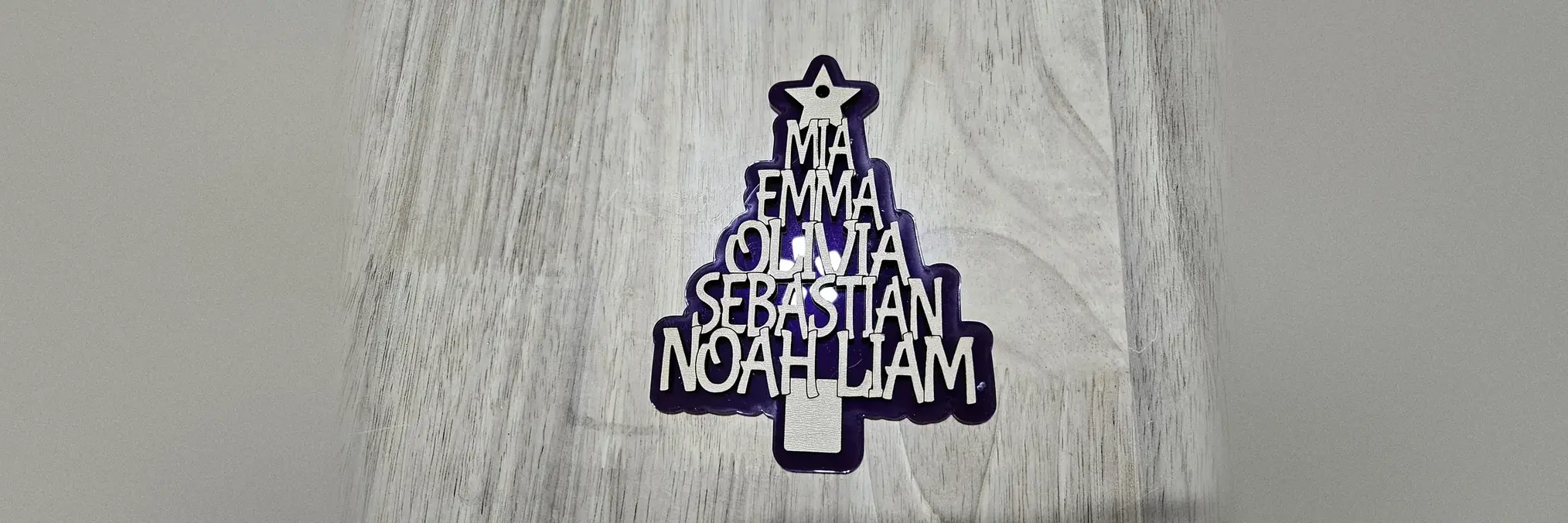
Making a family names Christmas tree with the Christmas Tree Names Generator
Difficulty: easy. Time: 5 minutes to set up, about 10 minutes to cut. Best methods: laser cut 3 mm plywood or acrylic, or a single-colour 3D print.
Each row of the tree is wider than the one above, and every name is stretched to fill its row. Sorting the names by length keeps the stretch small, so a short name sits on a narrow row and a long one on a wide row.
When most of the names are about the same length, the generator can put two short ones on one line. That gives the tree a wider base instead of a straight column.
On this page (4)
What you need
- 3 mm plywood or acrylic, about 100 by 140 mm
- Ribbon or thread for hanging
1. Type the names
Type the names under One name per line, up to 24 lines. To keep two names together, type them on the same line, for example Anna & Tom.
Leave Pair short names on. When the names alone would make a column rather than a tree, two short names share a line. Turn it off to keep one name per line.
2. Shape the tree
- Pick a Font. Bold fonts with thick strokes join best.
- Keep Capital letters on. Small lower case parts such as the dot of an i can end up loose, and the panel warns you when that happens.
- Set the Width and the Height of the names. The symbol and the trunk are added above and below that height.
- Raise Line overlap or Letter overlap if a letter is not joined to the tree.
- Under Top of the tree, keep the star or pick another Symbol. The Hanging hole goes through the symbol when there is room.
Choose your build method
Laser cutting
Score and cut
- Download the SVG.
- Run the score layer first, at low power, so the edges between the letters show.
- Cut the red outline. The whole tree comes out as one piece.
- Thread a ribbon through the hole.
3D printing
Print settings
- Download the STL or the 3MF. Thickness sets how thick the tree is.
- Print it lying flat. The score lines are not in the 3D files, so pick a font whose letters still read when they touch.
Next steps and project ideas
- Make one for each branch of the family, with the grandparents on the bottom line.
- Put a heart or a snowflake on top instead of the star.
- Cut it from mirror acrylic and hang it in a window.
Take the design into your software
Was this guide helpful?
More in Ornaments


Keep up with MyLaserTools.
Email me about new tools, product updates, tutorials, and occasional MyLaserTools offers. Unsubscribe at any time.
© 2026 MyLaserTools.com. All rights reserved.