

3D printing basics
FDM and resin printers, filament choices, slicing, and how STL and 3MF files from MyLaserTools turn into printed parts.
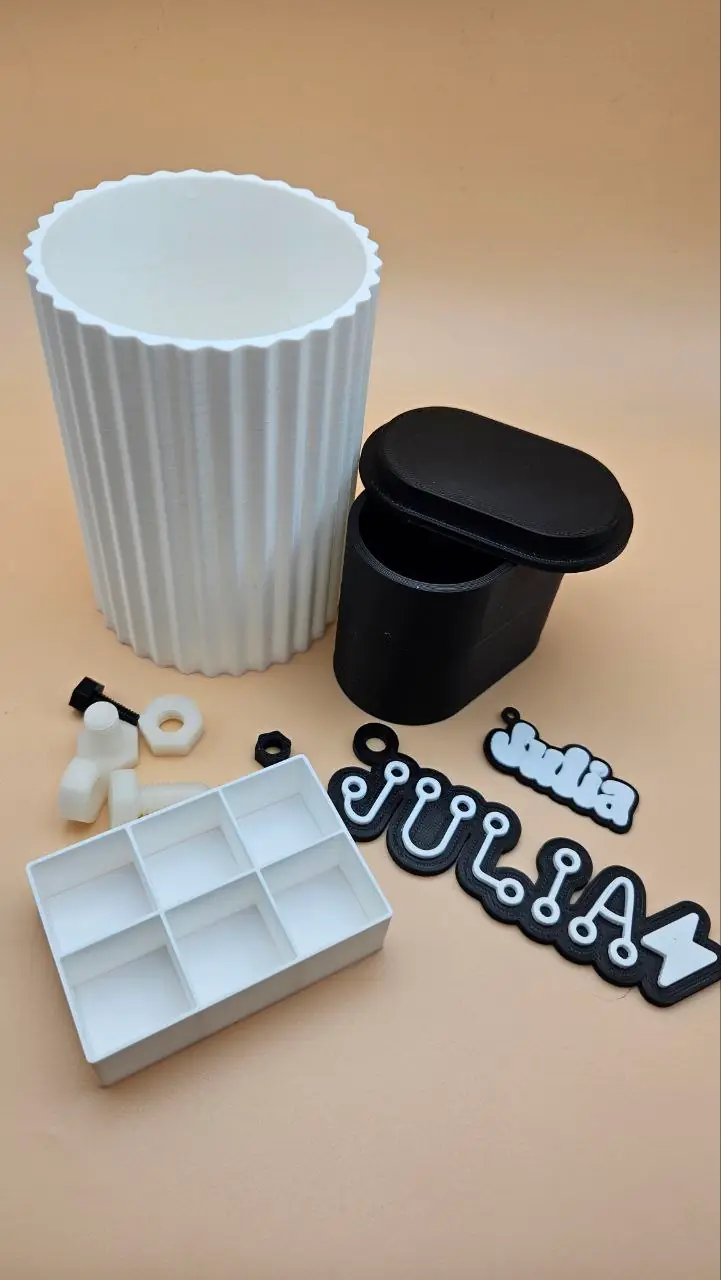
What is 3D printing?
3D printing builds physical objects layer by layer from a digital file. The printer reads a sliced file and deposits or cures material one thin layer at a time until the full shape is complete. What once required expensive industrial equipment is now available in desktop machines costing a few hundred dollars, making 3D printing one of the most accessible manufacturing technologies for makers, small businesses, and designers.
3D printing is useful for enclosures, prototypes, decorative pieces and shapes that are awkward to make from flat sheets. It adds material layer by layer. Supports, purge material and failed prints still create waste, so orientation and slicing choices matter.
Types of 3D printing
FDM (Fused Deposition Modeling) is by far the most common type for hobbyists and small businesses. A heated nozzle melts plastic filament and deposits it in layers. Popular FDM machines include the Bambu Lab P1S, X1C, A1, Prusa MK4, Creality Ender 3, and Bambu Lab A1 Mini. FDM is affordable, fast, and produces strong parts.
Resin printing (MSLA / SLA) cures liquid resin with light and can reproduce fine detail. Printed parts need washing and curing according to the resin instructions. Follow the safety data sheet for gloves, eye protection, ventilation and disposal; avoid skin contact with uncured resin.
Common materials
PLA
PLA is a common starting material for decorative FDM prints. It is relatively easy to print but can soften in hot environments, such as a parked car. Check the filament maker's temperature guidance.
PETG
Stronger and more heat resistant than PLA. Slightly harder to tune but excellent for functional parts. Good layer adhesion and low warping.
ABS
ABS is used for tough, heat-resistant parts. It is prone to warping and generally needs an enclosed printer with suitable ventilation. Follow the printer and filament instructions.
ASA
UV and weather resistant alternative to ABS. Better for outdoor use. Requires similar print conditions to ABS.
TPU
Flexible filament for phone cases, gaskets, and grips. Prints slowly and requires a direct-drive extruder for best results.
Resin
Ultra-fine detail. Standard, ABS-like, and flexible variants available. Requires UV curing and safe handling, wear gloves.
Key terms
Layer height
Thickness of each printed layer. Thinner layers (0.1mm) give more detail; thicker layers (0.3mm) print faster. 0.2mm is the standard default.
Infill
The internal structure of an FDM print. Density and pattern affect material use, print time and strength, together with wall count, layer bonding and orientation. Use a suitable profile and test parts that must carry a load.
Supports
Temporary structures printed to hold up overhanging sections. Removed after printing. Good slicer settings minimise the need for them.
Bed adhesion
How well the first layer sticks to the build plate. Use the cleaning method, plate temperature and any adhesive recommended for that plate and filament. Watch the first layer for gaps or lifting.
Slicing
Converting a 3D model (STL or 3MF) into printer instructions (G-code). Done in slicer software like Bambu Studio or PrusaSlicer.
Manifold or watertight
A closed mesh with no holes or loose edges, so the slicer can tell inside from outside. If the slicer warns about the mesh, use its repair option and check the sliced layers.
STL and 3MF
The two model files a slicer opens. An STL is one shape in one colour, with no units. A 3MF can hold several parts, each with its own colour, and keeps the size.
Filament change
A pause at a chosen layer so you can swap the filament for another colour. It lets a printer with one nozzle and no AMS print a name in a second colour on a backing.
File formats
STL is the traditional 3D printing format. It stores the mesh as a list of triangles with no colour or material data. Works with every slicer.
3MF can store units, parts and colour information alongside the mesh. Where a MyLaserTools export provides separate parts, keep them together during import and assign filaments in the slicer. Select your own printer and material profile before slicing.
Getting started
- Level your bed carefully before every print session, or invest in a machine with automatic bed levelling like the Bambu Lab A1 or Prusa MK4.
- Start with PLA. It is the most forgiving filament and works well on open-frame printers without an enclosure.
- Store filament in a dry box or sealed bag with desiccant. Moisture causes bubbles, stringing, and weak layers.
- Use the slicer profiles provided by your printer manufacturer as a starting point, then adjust from there.
- Slow down for the first layer. A good first layer is the foundation of a good print.
MyLaserTools for 3D printing
Choose a tool below, enter the finished dimensions and export an STL or 3MF where available. In your slicer, check the size, orientation, thin features and layer preview before printing. Assign filaments to multipart models yourself.
3D Print Keychain Generator
Personalized keychain with raised text on a shaped plate. Enter a name, choose a shape, set thickness and text raise height, and export a merged single-body STL or two-colour 3MF. Ready to slice immediately.
3D Vase Generator
Custom decorative vase with adjustable height, diameter, wall thickness, and profile curve. Exports a single watertight STL. Print in a single colour or use spiral vase mode in your slicer.
3D Box Generator
Generate a storage box with a separate lid. Set dimensions and fit clearance, then print a small fit test before committing to a large box.
3D Machine Screws + Nuts Generator
Fully custom metric or imperial machine screw and nut pair. Set diameter, thread pitch, head style, and length. Useful for printed hardware, props, and educational models. Exports clean manifold STL and 3MF.
3D Washer Generator
Create standard or custom washers with adjustable outer diameter, inner diameter, and thickness. Useful for spacing, load distribution, and fit tuning in printed assemblies.
3D Standoffs / Spacers Generator
Generate cylindrical spacers and standoffs for panel spacing, enclosure assembly, and PCB mounting. Set outer diameter, inner diameter, and length.
3D Dowel Pins Generator
Create simple alignment pins with custom diameter and length for jigs, fixtures, and modular printed assemblies.
3D Chicago Screw Generator
Generate printable two-part Chicago screws (male and female) for straps, leather goods, and serviceable assemblies.
3D Threaded Pin Generator
Create printable metric threaded rods without heads, using the same ISO-style presets as the machine screw generator.
3D Grid Box Generator
Storage box with a customisable grid divider insert. Set the number of rows and columns alongside overall dimensions. Ideal for hardware organisation and craft storage.
3D Backpack Tag Generator
Make a tag with raised text on a plate and a strap slot. A multipart 3MF lets you assign different filaments to the body and text in a compatible slicer.
Keep up with MyLaserTools.
Email me about new tools, product updates, tutorials, and occasional MyLaserTools offers. Unsubscribe at any time.
© 2026 MyLaserTools.com. All rights reserved.