

Building a laser cut dollhouse with the Dollhouse Generator
Difficulty: medium. Time: 20 minutes to set up, an afternoon to cut and assemble. Best methods: laser cut plywood, or 3D printed parts.
Scale decides almost everything here. 1:12 is the usual collector size, and the house comes out about 56 cm across, more than most laser beds hold. 1:24 is half that and fits on a shelf. 1:48 sits in your hand. Picking a scale sets the room height, the door and window sizes and a starting footprint, and you can change the footprint afterwards.
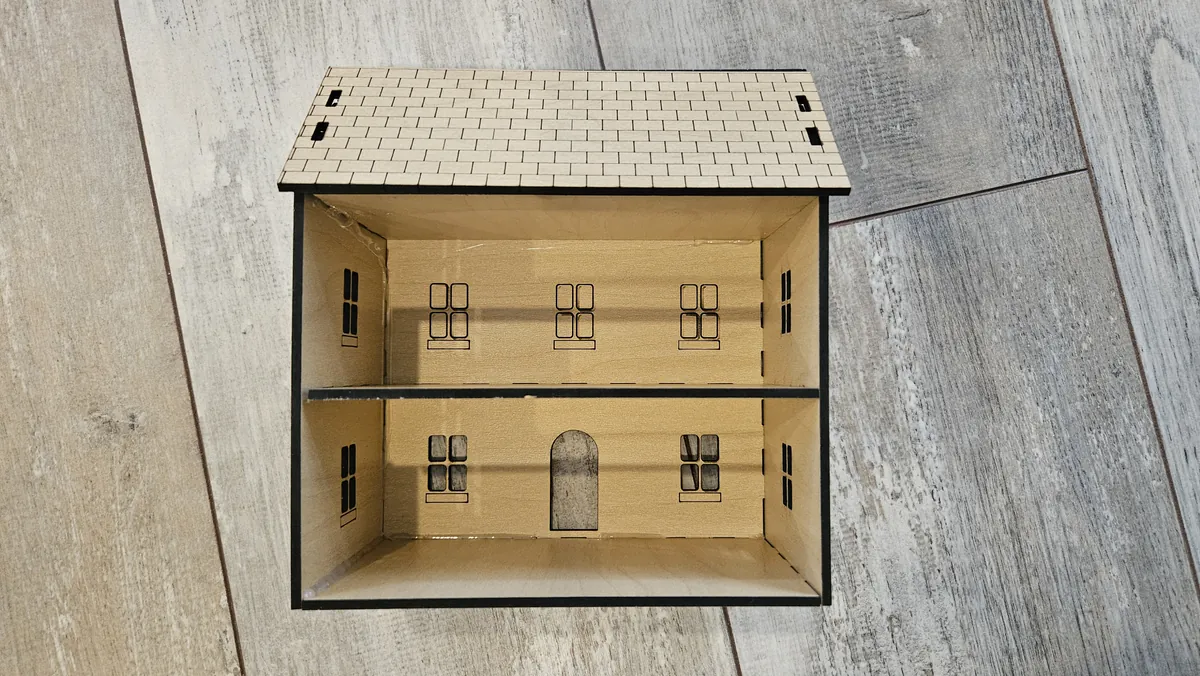
The floors are real structure. Each one has tabs that slot through the end walls, so the walls stay square without clamps while the glue sets.
What You'll Need
- 1:24 and 1:48: 3 mm TruFlat maple plywood. The pale face takes shingle and window engraving cleanly, and a flat sheet keeps every slot the same width.
- 1:12: 6 mm plywood, and more than one sheet
- Wood glue
- Calipers to measure your sheet
Step 1 - Pick a scale and the floors
Under House, choose the Scale, then set Floors to one, two or three. Floor-to-floor height shows how tall the rooms come out inside. Leave Open back on if you want to furnish the rooms, and turn on Attic floor for a closed top room with an attic under the roof.
Step 2 - Windows and door
- Windows across sets how many columns of windows run along the front. The door takes the middle spot on the ground floor.
- Window style is four panes, a single pane, arched or round. Window sills engraves a sill under each one.
- Front door can be cut out, engraved, or left off.
- Side windows adds one window per floor on each end wall, and Attic window puts one in the gable.
Step 3 - Roof, walls and export
Set the Roof pitch and the overhangs, then pick a Roof engraving (shingles or fish scale) and a Wall engraving if you want siding, boards or brick. The engraving stops short of the joints and the openings. Open Material and joints, enter the thickness you measured with calipers, and download the SVG.
Choose Your Build Method
Cut and build from the bottom up
- Run the engrave pass first for shingles, sills and wall texture, then the cut pass.
- Stand the end walls in the base.
- Slide each floor into its slots, starting at the bottom. The tabs hold the end walls square.
- Add the front wall, and the back wall if you left the back closed.
- Set the roof over the gable tabs and glue it last.
Make It Yours
- Paint the rooms before you glue the front wall on. It is much harder to reach in afterwards.
- Glue thin clear acrylic behind the window openings for glazed windows.
- Run a strip of LED fairy lights under each floor.
- For a single open-front room with shelves, use the Coffee Shop Diorama Generator instead.
Keep up with MyLaserTools.
Email me about new tools, product updates, tutorials, and occasional MyLaserTools offers. Unsubscribe at any time.
© 2026 MyLaserTools.com. All rights reserved.