
Text Mold Maker
Free 3D-printable mold maker for any name or word. Perfect for kinetic sand, air-dry clay, play-doh, and cookie dough. Pick a font, set the wall thickness, and download your STL or 3MF file.
Examples
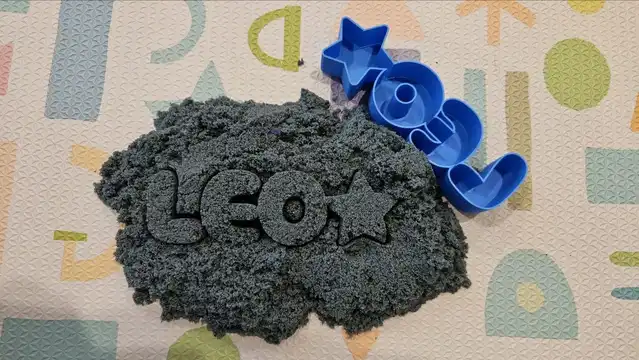
See what you can make with the Name Cutter & Mold Maker. These cutters were 3D printed and used with kinetic sand and cookie dough.
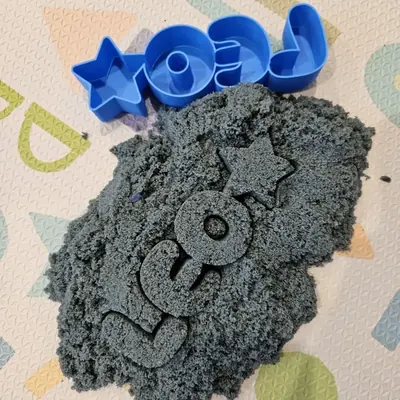
Materials used:
- Blue PLA filament
- Kinetic sand
Frequently Asked Questions
Yes. The Text Mold Maker is 100% free with no limits, no watermarks, and no trial period. Generate and download as many files as you want, free forever.
Free 3D-printable mold maker for any name or word. Perfect for kinetic sand, clay, play-doh, and cookie dough. Download STL or 3MF.. Adjust the settings, preview your design in real time, and download a ready-to-make file in seconds.
It exports STL files for 3D printing, and multi-colour 3MF files where multiple parts or colours are involved. Files are generated instantly in your browser.
3D printers via slicers such as Bambu Studio, PrusaSlicer, OrcaSlicer, and Cura, with 3MF files carrying colour data for multi-colour prints.
You can use PLA, PETG, ABS, TPU, and any filament your printer supports for 3D printing. The generated files are standard formats compatible with any material your machine can handle.
No account or sign-up is required for the Text Mold Maker. It runs entirely in your browser, your designs never leave your device, and there is nothing to install.
Yes. A commercial license is included, so you can sell products made with the Text Mold Maker on Etsy, Amazon Handmade, Shopify, at craft fairs, or anywhere else. Attribution is appreciated but not required.
Visit the MyLaserTools Learning Center for a step-by-step Text Mold Maker guide, plus material tips and file-format help for laser cutting, CNC, and 3D printing. The guides walk you through every setting and how to prepare your files for your machine.
Open the Text Mold Maker guideHow To Use
Type your name or word in the Name / Word field and pick a font. Script and connected fonts work best; they merge naturally into a single flowing shape.
Set the Text Width to control how large your mold will be. Adjust Letter Spacing and Word Spacing to fine-tune the look, and enable Connected letter mode to merge overlapping glyphs into one solid outline.
Optionally add a Symbol beside the text. Choose position (left, right, or both sides) and scale it to match the text height.
Adjust Outline Thickness (the border around the letters) and Depth (how tall the stamp is). 2–3 mm outline and 15–20 mm depth works well for kinetic sand and clay.
Mirror Text is on by default so impressions read correctly in sand or clay. Uncheck it if you want the text un-mirrored, for example when cutting from the back side.
Check the 3D Preview to see how the mold will look when printed. The letters are recessed into the top of the stamp block. Rotate and zoom to inspect from any angle.
Download as STL or 3MF and print on any FDM printer. Print flat on the bed with the pocket side facing up. PLA at 0.2 mm layer height works great.
About
The Text Mold Maker is a free browser-based tool that turns any name, word, or short phrase into a 3D-printable mold or cookie cutter. It uses connected script fonts to merge letters into a single flowing shape, the same technique used by professional cookie cutter designers, so you get clean walls and no floating letter pieces.
It's designed for three main uses: kinetic sand and sand art (press the mold into sand and lift to leave a raised name), clay and play-doh (stamp into air-dry clay, polymer clay, or play-doh for craft projects and kids' activities), and cookie dough and fondant (cut personalised name cookies for birthdays, baby showers, and school events).
Download your design as an STL or 3MF file and print it on any FDM printer. No account required, no watermarks, and no limits on how many molds you make.
Keep up with MyLaserTools.
Email me about new tools, product updates, tutorials, and occasional MyLaserTools offers. Unsubscribe at any time.
© 2026 MyLaserTools.com. All rights reserved.