

Door Box Generator
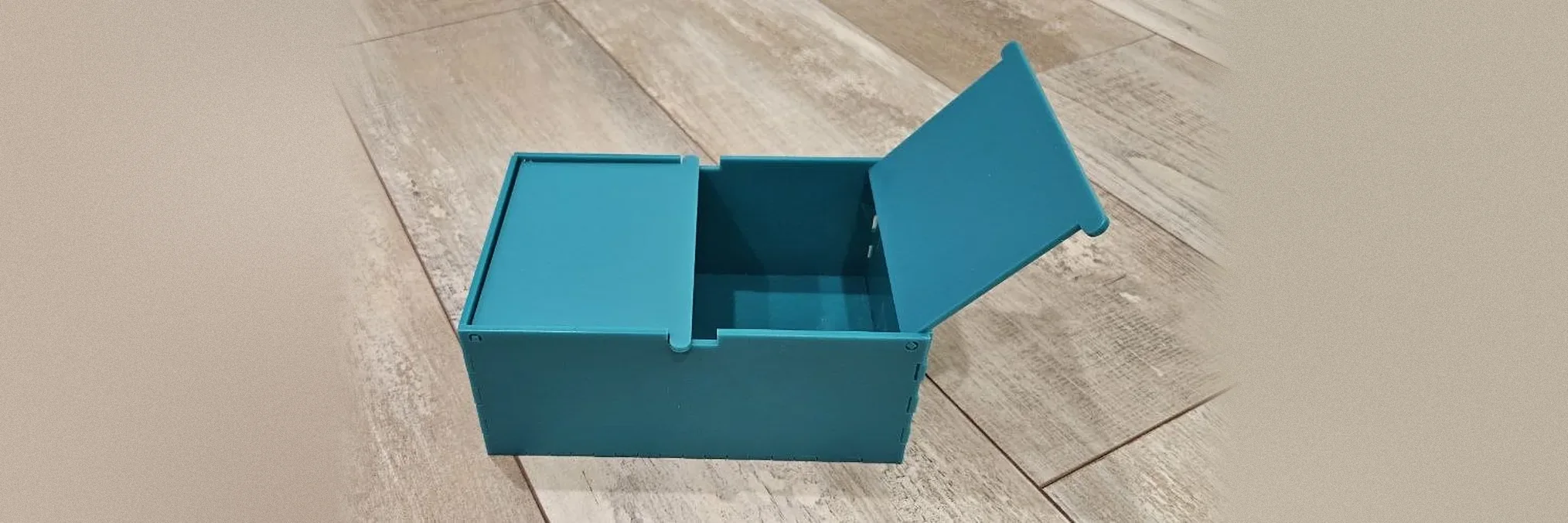
A finger-jointed box whose lid opens on hinges cut from the lid itself: two doors that open to the sides, or one lid that flips up. No hinges or pins to buy.
Settings
Lid
Inside size
Construction
Vector Export
3D Print Design
The STL and 3MF are ready to print: the box is one solid piece and each door or lid prints flat beside it. Flex the walls slightly to clip the pins into their holes.
3MF preserves richer print metadata when your slicer supports it.
Generate a design to see the 2D preview
Generate a design to see the export preview
Examples
Each door turns on square pins cut from the door itself, sitting in round holes in the end walls. No metal hinges or screws.
Material used:
Set the material thickness to match your sheet before cutting, since every tab and slot is sized from it.
How To Use
Frequently Asked Questions
Each door has two square pins cut from the same sheet at the ends of its hinge edge. They sit in round holes in the walls, so the square pin turns freely inside the round hole.
The doors go in while you build the box. Glue the base and two walls, place the doors with their pins in the holes, then add the last walls so the pins are trapped.
Raise the hinge clearance by 0.05 mm and cut the walls again. Check that the thickness you entered matches your real sheet, because the pins are exactly that thick.
Visit the MyLaserTools Learning Center for a step-by-step Door Box Generator guide, plus material tips and file-format help for laser cutting, CNC, and 3D printing. The guides walk you through every setting and how to prepare your files for your machine.
Open the Door Box Generator guideAbout
This free door box generator builds a box with a hinged lid and no hardware. Each lid leaf has square pins cut at the ends of its hinge edge that turn inside round holes in the walls, and ears on the free edge that rest in a notch to hold it closed and stick out as finger grips. Choose two doors for a chest that opens to both sides, or a single lid for a classic keepsake box, and cut everything from one sheet.
Keep up with MyLaserTools.
Email me about new tools, product updates, tutorials, and occasional MyLaserTools offers. Unsubscribe at any time.
© 2026 MyLaserTools.com. All rights reserved.