

Paint by Number Generator
Free tool to convert photos into paint-by-number SVG files for laser engraving. Simplify images to numbered color regions with engravable outlines and a color legend.
Upload Image
Drag & drop or click to upload
Supports JPG, PNG, GIF, WebP
Only upload images you own or have permission to use.
Color Preview
Upload an image to generate paint-by-number
SVG Export Preview
Upload an image to see SVG preview
Examples
Custom paint-by-number designs laser engraved on plywood. Perfect for personalized gifts, kids activities, and craft projects.
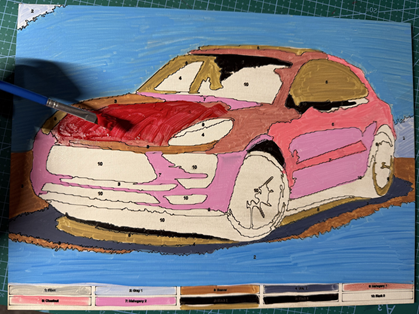
Materials used:
Material Suggestions
For best results, use light-colored materials that show engraved lines clearly. TruFlat Paint Plywood is ideal as it provides a smooth, paintable surface perfect for paint-by-number projects. Birch plywood and light-colored laser-grade plywood also work well.
How To Use
Frequently Asked Questions
Yes. The Paint by Number Generator is 100% free with no limits, no watermarks, and no trial period. Generate and download as many files as you want, free forever.
Free tool to convert photos into paint-by-number SVG files for laser engraving with numbered regions and color legend. Adjust the settings, preview your design in real time, and download a ready-to-make file in seconds.
It exports clean, machine-ready SVG vector files with separate cut and engrave layers where applicable. Files are generated instantly in your browser.
Laser cutters and engravers including Glowforge, xTool, LightBurn, OMTech, Epilog, Trotec, Thunder Laser, and any machine that accepts SVG or vector files. CNC routers and mills via SVG import in tools like Vectric, Carbide Create, Easel, and Fusion 360.
You can use wood, acrylic, leather, MDF, plywood, cardboard, and paper for laser cutting and CNC. The generated files are standard formats compatible with any material your machine can handle.
No account or sign-up is required for the Paint by Number Generator. It runs entirely in your browser, your designs never leave your device, and there is nothing to install.
Yes. A commercial license is included, so you can sell products made with the Paint by Number Generator on Etsy, Amazon Handmade, Shopify, at craft fairs, or anywhere else. Attribution is appreciated but not required.
Visit the MyLaserTools Learning Center for a step-by-step Paint by Number Generator guide, plus material tips and file-format help for laser cutting, CNC, and 3D printing. The guides walk you through every setting and how to prepare your files for your machine.
Open the Paint by Number Generator guideAbout
Transform your photos into custom paint-by-number designs with our free generator tool. Upload any image and instantly create laser-engraveable SVG files with numbered regions, outlines, and a color legend. Perfect for creating personalized paint-by-number kits on wood, acrylic, or other laser-compatible materials. The tool automatically quantizes colors, traces region boundaries, and places number labels for easy painting. Compatible with Glowforge, xTool, Epilog Laser, Trotec Laser, and other laser cutters. Blue lines are optimized for engraving while the red outline provides a cut line for the frame.
Keep up with MyLaserTools.
Email me about new tools, product updates, tutorials, and occasional MyLaserTools offers. Unsubscribe at any time.
© 2026 MyLaserTools.com. All rights reserved.