
Connected Text Generator
Free beautiful connected text generator for laser cutting and 3D printing. Perfect for flowing cursive designs.
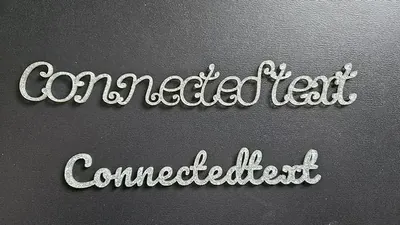
Examples
Create beautiful connected text perfect for laser cutting or engraving. This tool lets you preview and download your design as an SVG for use with your crafting tools.
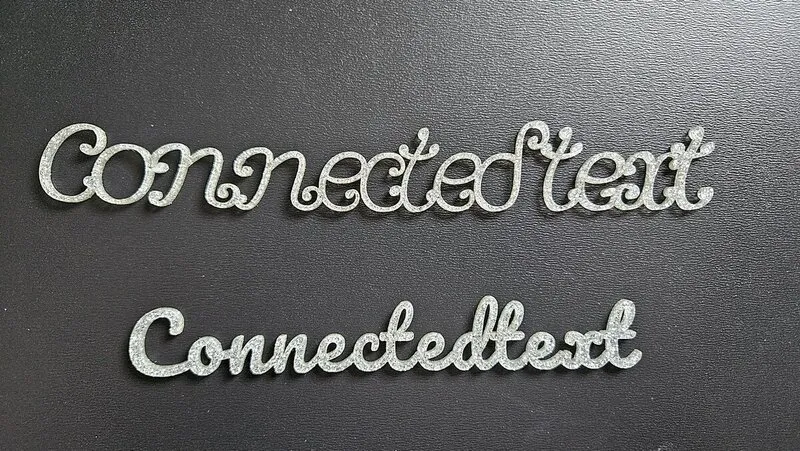
Materials used:
Material Suggestions
Our SVG files are perfect for a variety of materials. For a classic look, try cutting your designs from wood or plywood. For a more modern and vibrant feel, acrylic in various colors and finishes is a great choice. You can also use cardstock or leather for a more unique and personal touch.
How To Use
Enter your text to transform it into beautiful connected typography. Use names, words, or short phrases for the best results.
Customize your design using the font selection, width, and thickness controls. Choose from flowing script fonts to create elegant connected text. Make sure the letters connected properly by adjusting the "Letter Spacing Adjustment" control.
When you're satisfied with your design, click the "Download SVG" button. Your custom connected text file will be ready to use with your cutting machine. You can open it in LightBurn (affiliate link) or other laser software.
Frequently Asked Questions
Yes. The Connected Text Generator is 100% free with no limits, no watermarks, and no trial period. Generate and download as many files as you want, free forever.
Free connected text maker for laser cutting and 3D printing. Horizontal or vertical cursive with optional score-and-cut letter edges. Adjust the settings, preview your design in real time, and download a ready-to-make file in seconds.
It exports clean SVG files for laser cutting, CNC, and vinyl, plus STL and multi-colour 3MF files for 3D printing. Everything is generated instantly in your browser.
Laser cutters and engravers including Glowforge, xTool, LightBurn, OMTech, Epilog, Trotec, Thunder Laser, and any machine that accepts SVG or vector files. CNC routers and mills via SVG import in tools like Vectric, Carbide Create, Easel, and Fusion 360. 3D printers via slicers such as Bambu Studio, PrusaSlicer, OrcaSlicer, and Cura, with 3MF files carrying colour data for multi-colour prints.
You can use wood, acrylic, leather, MDF, plywood, cardboard, and paper for laser cutting and CNC, and PLA, PETG, ABS, TPU, and any filament your printer supports for 3D printing. The generated files are standard formats compatible with any material your machine can handle.
No account or sign-up is required for the Connected Text Generator. It runs entirely in your browser, your designs never leave your device, and there is nothing to install.
Yes. A commercial license is included, so you can sell products made with the Connected Text Generator on Etsy, Amazon Handmade, Shopify, at craft fairs, or anywhere else. Attribution is appreciated but not required.
Visit the MyLaserTools Learning Center for a step-by-step Connected Text Generator guide, plus material tips and file-format help for laser cutting, CNC, and 3D printing. The guides walk you through every setting and how to prepare your files for your machine.
Open the Connected Text Generator guideFree for Personal and Commercial Use
Use generated designs for personal projects and commercial physical products, including Etsy shops and small businesses. Most tools need no account. Map-data attribution and third-party license notices may still be required.
Compatible Software & Machines
About
Our connected text generator automatically joins letters into a single, continuous path, merging dots on i's and j's and connecting every glyph so the result cuts as one clean piece. Lay your text out horizontally or stack it vertically for tall narrow signs, banners, and bookmarks. Ideal for laser-cut name signs, script cake toppers, personalized nursery decor, wedding signage, and acrylic keychains.
Turn on Score Letter Edges to add a separate score layer that traces where letters meet inside the welded outline, so your laser scores the inner seams and cuts only the outer shape. The single-path output means no loose letter pieces and no weeding individual characters. Experiment with cursive and script fonts on 1/8" birch plywood, 3mm acrylic, leather, or cardstock. Adjust thickness and letter spacing to dial in the look for any material thickness. Download your SVG and open it directly in LightBurn, Glowforge, xTool Creative Space, Cricut Design Space, or Inkscape. No conversion needed.
Keep up with MyLaserTools.
Email me about new tools, product updates, tutorials, and occasional MyLaserTools offers. Unsubscribe at any time.
© 2026 MyLaserTools.com. All rights reserved.