

Engraving word clouds with the Word Cloud Generator
Difficulty: easy. Time: 15 to 30 minutes of design, plus engrave time. Best methods, in order: laser engraving, UV printing.
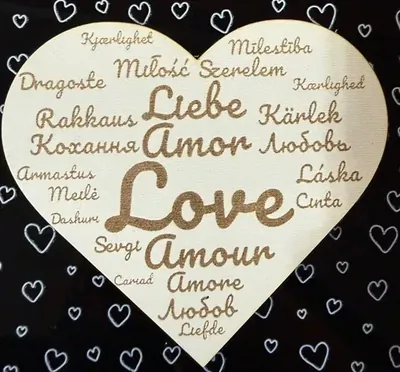
A word cloud turns a list of meaningful words into art: family names, inside jokes, song lyrics, classroom adjectives, all sized by how much they matter and packed into a clean shape. This generator gives you full control of the list, with a weight per word, a heart or circle boundary, and ready-made themes to start from.
The export is a vector SVG, which means razor-sharp engraving at any size instead of the fuzzy raster images most online cloud makers produce. It is a go-to for Mother's Day, anniversaries, retirements, and teacher gifts.
What You'll Need
- Laser engraving: laser cutter, 3 mm laser-grade plywood, a leatherette patch, or coated metal blanks
- UV printing: flatbed UV printer and an acrylic or metal panel
Step 1 - Pick a shape and build your list
Open the tool and choose the Shape: Heart for sentimental gifts, Circle for everything else. Either start from a Pre-Populate Theme and edit, or build your own list in Words: each entry has a Word and a Weight, and weight drives size. Put 2 or 3 hero words at high weight (names, the core message), a handful at medium, and let small filler words pack the gaps.
Step 2 - Style it
- Pick one Font for the whole cloud; clean sans and slab faces stay legible at the tiny filler-word sizes.
- Set Canvas Size for your finished piece; clouds with 25 or more words want at least 200 mm so the smallest words survive engraving.
- Regenerate the layout until the hero words land where you want them; each shuffle repacks the cloud.
Step 3 - Export
Download the SVG. Every word is a vector path, so it scales cleanly whether you engrave a 100 mm ornament or print a 600 mm panel.
Choose Your Build Method
Engraving the cloud
- Import the SVG and set the words to raster engrave (or score the outlines only for a faster, lighter look).
- Engrave on fine-grained plywood like maple or birch; coarse grain eats small words.
- Run a small test patch first; the smallest filler words define your minimum power and resolution.
- On leatherette, one light pass marks dark and crisp, perfect for patch-style gifts.
- Cut the heart or circle outline as the final operation to free the finished piece.
Make It Yours
- Mother's Day heart: her name huge in the middle, surrounded by everything the kids call her.
- Anniversary cloud: wedding date, song lyrics, and every city you have lived in together.
- Teacher retirement circle packed with decades of subject words and student names.
- Team gift: club name as the hero word, every member's name around it.
- New-baby heart with the name, birth stats, and family nicknames.
- Engrave a small circle version on a leatherette patch for a custom hat.
- Classroom kindness cloud: adjectives the students chose for each other.
- Pair the heart cloud with the Split Monogram tool for a two-piece gift set.
New free tools, every month.
New laser cutting tools, what's coming next, and features we're building right now. Only MyLaserTools.com news. No spam, ever.
© 2026 MyLaserTools.com. All rights reserved.