

Making social media handle keychains with the Social Keychain Generator
Difficulty: easy. Time: 10 minutes design, 10 minutes cutting. Best method: two-layer laser cut in contrasting acrylic.
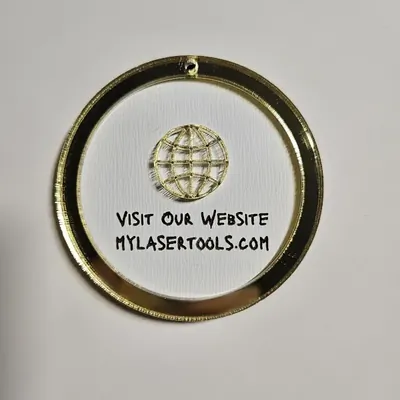
Part business card, part keychain. Choose a Social Network (Instagram, Facebook, email, website, Wi-Fi, link, or search), type your Username and a short Call to Action, and the generator lays out a tag with the platform logo, your handle, and a hanger hole. The SVG exports as a frame-plus-logo layer and a backplate layer, so a two-color stack looks store-bought. Makers hang these on market stalls, product packaging, and their own keys.
What You'll Need
- Laser cutting: 3 mm acrylic in two contrasting colors, or laser-grade plywood with an engraved face
- Assembly: 3M 467/468 tape for clean acrylic-to-acrylic bonding
- Hardware: keychain snap clips or ball chains for packaging tags
Step 1 - Pick the platform and write the text
Select the network so the right logo loads, then enter your Username exactly as people should type it. Keep the Call to Action short - Follow us, Scan me, Find us at - long phrases shrink the handle text.
Step 2 - Size and style
- Pick Small, Medium, or Large - medium suits keys, large reads from a market table.
- Adjust Border Width for the frame and Hole Size for your ring or chain.
- Tune the Social Icon Size slider so the logo balances the text instead of crowding it.
- Pick a clean, heavy font; handles full of underscores and dots need all the stroke width they can get.
Step 3 - Export the SVG
Download the SVG. The frame-with-logo layer and the backplate come out as separate paths so you can assign different colors or operations in your laser software.
Choose Your Build Method
Laser cutting
- Cut the backplate from your accent color and the frame + logo layer from the main color.
- Alternatively, single-layer it: cut the outline once and raster-engrave the logo and text on plywood or two-tone acrylic.
- Bond the layers with 3M tape applied before cutting the top sheet - cutting through pre-applied tape gives perfectly matched adhesive.
- Add a snap clip, or a ball chain if these are hanging on product bags.
Make It Yours
- Make a Wi-Fi version for your guest room or cafe with the network name as the handle.
- Batch 50 with your shop handle and drop one in every order as free marketing that people keep.
- Use brand colors: white logo layer on the platform's signature color reads instantly.
- Make a matched set - Instagram, website, email - and hang all three on your market banner.
- Engrave the back with a discount code so the keychain doubles as a coupon.
- Cut a large version as a counter sign with the hole used for display cord instead of keys.
New free tools, every month.
New laser cutting tools, what's coming next, and features we're building right now. Only MyLaserTools.com news. No spam, ever.
© 2026 MyLaserTools.com. All rights reserved.