

Making snowman ornaments with the Snowman Ornament Generator
Difficulty: easy. Time: 10 minutes design, 15-20 minutes on the laser. Best method: laser-cut plywood or white acrylic.
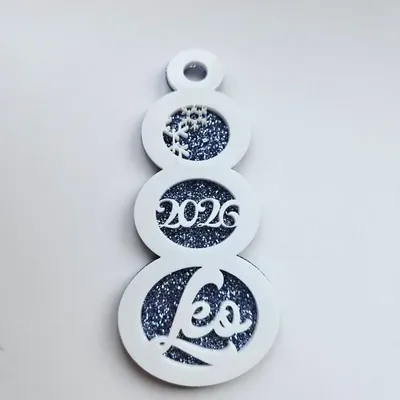
Three circles, a charming trick: type up to three words in Snowman Text and each lands in its own circle - head, middle, bottom - and whichever circles you leave empty get an automatic snowflake instead. One name fills the middle with snowflakes above and below; a three-word family name uses all three. Pick Single Layer for a one-piece cut or Two Layer for a Base Layer plus Detail Layer stack, and size each circle independently with the Top Circle (Head), Middle Circle, and Bottom Circle controls.
What You'll Need
- Laser cutting: 3 mm white or frosted acrylic - it is a snowman, white sells it - or laser-grade plywood
- Assembly (two-layer): 3M 467 tape or CA glue, plus a colored backing acrylic
- Finishing: ribbon for hanging
Step 1 - Words in circles
Decide the story: one name (middle circle, snowflakes top and bottom), first and last name (two circles), or a family of words. Short words fit round circles best; the connected text shrinks to fit, so keep each word under about eight letters.
Step 2 - Proportion the snowman
- Tune the three circle sizes - a classic snowman tapers, so keep the head smallest.
- Ornament Size around 90-110 mm tall hangs well; Border Thickness keeps the circle rims sturdy.
- Set Hole Size for your ribbon and pick the Design Type - two-layer puts a solid silhouette behind the cut-out detail.
Step 3 - Export the SVG
Download the SVG; two-layer designs export the Base Layer and Detail Layer as separate paths.
Choose Your Build Method
Laser cutting
- Single-layer: one cut pass on white acrylic and it is finished as it falls out of the machine.
- Two-layer: cut the detail layer in white and the base in ice blue or glitter silver, then bond - the color glows through the snowflake cutouts.
- Small snowflake details cut cleanest slightly slowed down.
- Thread ribbon through the hanger and stack a production run: snowmen nest efficiently on a sheet.
Make It Yours
- Family snowman: each kid's name in a circle, parents on the base circle.
- Baby's first Christmas: name in the middle, year in the bottom circle.
- Glitter silver backing behind white acrylic is the snow-in-sunlight look.
- Leave all three circles empty for a pure snowflake snowman that needs no personalization.
- Make a garland of small snowmen sharing one ribbon.
- Plywood version with engraved (not cut) words for a rustic cabin tree.
- Pair with the Tree Ornament and Christmas Ornament generators for a full coordinated set.
New free tools, every month.
New laser cutting tools, what's coming next, and features we're building right now. Only MyLaserTools.com news. No spam, ever.
© 2026 MyLaserTools.com. All rights reserved.