

Cutting clean basics with the Shape Generator
Difficulty: easy. Time: 5-10 minutes. Methods: laser cutting or 3D printing.
Half of laser work is just needing a clean basic shape at an exact size: a hexagon coaster blank, a star ornament, a bone-shaped pet tag, a circle with a hanger hole. Drawing these in design software means fiddling with snapping and math. This tool gives you a parametric shape library where everything is exact by construction.
Beyond the geometric primitives (Polygon with 3-12 sides, Circle, Square, Star with adjustable points), there is a full novelty set: Heart, Arrow, Bell, Bone, Carrot, Cookie, Drop, Egg, Flower, Ghost, House, Balloon, Cloud, Pen, Pin, Ribbon, Tag, Tree (pine or deciduous), and Wrench. Every shape can be stretched, rounded, resized, given a hanger hole, and exported flat or as 3D geometry.
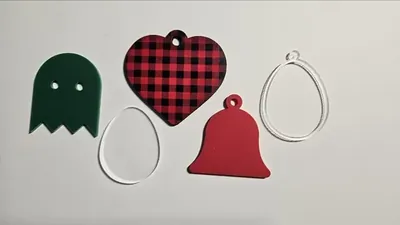
What You'll Need
- Laser: laser-grade plywood or acrylic scraps; shape blanks are the ultimate scrap-buster
- 3D printing: any FDM printer and filament for cookie cutters, tags, and ornaments
- Ribbon, cord, or rings if you are using the hanger hole
Step 1 - Pick and shape
Open the Shape Generator and pick a shape from the selector. For Polygon, set the Number of Sides (hexagons and octagons make instant coasters); for Star, set the Number of Points. Use Corner Radius to soften sharp vertices, which also makes cut shapes friendlier to handle and 3D prints stronger at the tips.
Step 2 - Size and detail
- Shape Size sets the finished dimension in your units; Horizontal Stretch and Vertical Stretch turn circles into ovals and squares into rectangles without distorting line quality.
- Hanger Hole Size adds a properly placed hole at the top for ornaments, tags, and charms; set it to fit your ribbon or ring.
- Outline Width adds a concentric outline, handy for two-tone layered shapes or score-line borders.
Step 3 - Export
Download SVG for the laser, or STL/3MF with your chosen extrusion depth for 3D printing.
Choose Your Build Method
Cut blanks and ornaments
- Import the SVG and gang up multiples; basic shapes nest tightly and cut in seconds each.
- Cut the hanger hole with the same pass as the outline; it is part of the path.
- For coaster sets, cut hexagons from 3 mm plywood and seal with a couple of coats of spray lacquer.
- Use the outline feature as a score line to guide hand-painting inside a border.
- Stack two sizes of the same shape in contrasting materials for instant layered ornaments.
Make It Yours
- Hexagon coaster set with a family monogram engraved in the center of each.
- Ghost and pumpkin-orange circle garland for Halloween, strung through hanger holes.
- Cloud shapes with raindrop Drops hanging below on thread for a nursery mobile.
- Stretch a star vertically for a tree topper that reads taller from across the room.
- House shapes as a realtor's closing gift tags: engrave the address and date.
- Tag shape plus hanger hole, cut in batches, is the fastest gift tag production line there is.
- Use Bone shapes as engraving blanks for a dog treat jar label or pet memorial charm.
New free tools, every month.
New laser cutting tools, what's coming next, and features we're building right now. Only MyLaserTools.com news. No spam, ever.
© 2026 MyLaserTools.com. All rights reserved.