

Making a personal route keepsake with the Route Map preset
Difficulty: Beginner (print) to Intermediate (laser) · Time: 20 minutes (print) to 90 minutes (layered laser) · Methods, ranked: 1) High-res print / UV print - the full-color palette is built for it, 2) laser engrave on wood or slate with the route as the deepest tone, 3) layered laser build using the backplate as a physical frame layer.
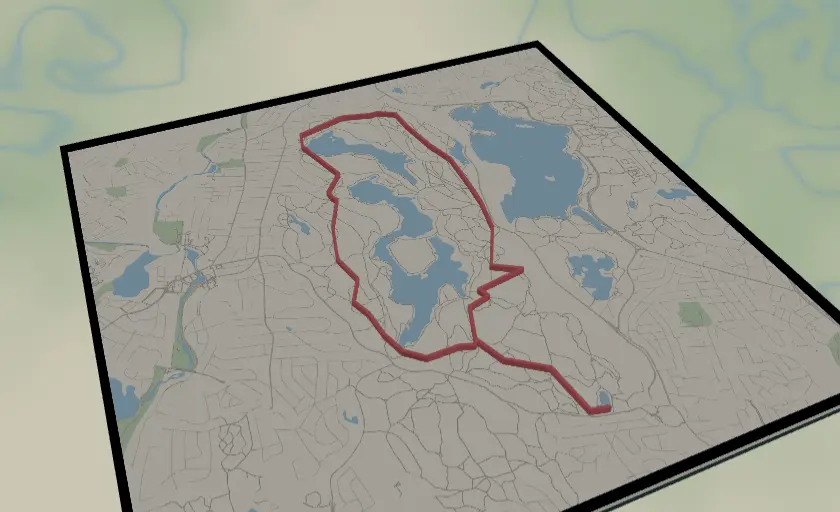
Your marathon. The first century ride. The proposal hike. This preset draws your GPX track as a bold red line over a soft, muted street map with a dark slate backplate - the route is the hero, the map is context. It ships preloaded with a sample hiking loop in the Middlesex Fells so you can see the styling immediately, then you replace it with your own recorded route. Perfect race-finisher gift, and one of the most personal things you can put on a wall.
What You'll Need
Print (recommended)
- The exported 4096 px PNG and a photo print service (or your own printer), frame of choice - or a UV flatbed onto white acrylic/Dibond for a premium finish
- Your GPX file: export it from Strava, Garmin Connect, Komoot, AllTrails ("Export GPX")
Laser engrave
- 3 mm Baltic birch, bamboo board, or slate coaster/plaque; laser engraver
Step 1 - Start from the preset
Open the Route Map preset. It loads on the Middlesex Fells reservation north of Boston at zoom 13.4, with the red sample loop already drawn.
Now make it yours: use Add layer → Route and upload your own .gpx file - then delete or hide the sample Route layer (or simply restyle the sample if you just want to explore). Re-search the map location to your route's area and let the route sit in frame.
Framing tips:
- Frame the route, not the city: zoom until the track fills roughly the middle 60–70% of the square.
- Loops look great centered; point-to-point routes (marathons!) read best running diagonally corner to corner.
- Leave one quiet corner of map for a future title/date engraving or caption.
Step 2 - Tune the layers
Three layer groups:
Route - your GPX track, styled #E63946 red at width 5. Both color and width are adjustable: width 5 is right for a 250–300 mm print; thicken to 6–7 if the route is long and zoomed out, or for engraving (the route should be the boldest mark on the piece). Color-shift to match the race's branding or the recipient's favorite color - everything else in the palette was kept muted so almost any strong color works here.
Streets - Solid mode, the quiet backdrop: parchment land (#F4F1EA), soft blue water, sage parks, and three road tiers in warm greys - secondary (width 2), neighborhood streets (1), and paths (width 1, #BBB5A6). The paths feature matters for trail routes: your GPX line will visibly follow the actual mapped trail. For urban races, paths can be hidden to declutter. Keep the streets muted - if you brighten them, the route stops popping.
Backplate - solid dark slate (#2F4F4F) behind everything. In prints it peeks through as the border frame surround; in layered laser builds it's the physical bottom layer; tweak it toward black for framing against dark walls.
Step 3 - Export
In the export modal:
- Print: high-res PNG (4096 px), Background toggle on. At 300 mm that's well over 300 DPI.
- Laser engrave: per-layer SVGs, or the combined SVG; the colors become engrave-depth hints (route darkest).
- Layered build: toggle layers and export the Streets SVG (engrave file), Route SVG (cut file for an inlay/overlay), and use the backplate as the cut base.
- Hanger hole if the piece will hang from cord or leather lace - top-center suits the square format.
- Small-polygon cleanup on; water inversion off (the soft blue water is part of the look).
Choose Your Build Method
Framed print / UV print
- Export the PNG and order (or print) at 250–300 mm square on matte photo paper - matte suits the muted palette.
- Add a caption in any editor before printing if you like: race name, date, distance, finishing time under the map.
- UV variant: print directly on white acrylic or Dibond and add anodized standoff spacers at the corners (enable Corner holes at export) for a gallery float mount.
Make It Yours
- Finisher's gift: route + "Boston Marathon · 26.2 mi · 3:42:11" engraved under the map - instant ugly-cry gift.
- Proposal hike: route in red, a small engraved heart at the summit point where you asked.
- Yearly tradition: same trail, one plaque per year, route color shifting through a gradient on the shelf.
- Multi-route piece: upload several GPX files as separate Route layers in different colors - every ride of a cycling tour on one map.
- Medal hanger: stretch the layout, mount the print/engraving above a rail of laser-cut hooks.
- Dark mode: backplate and land near-black, streets dark grey, route in neon orange - export the PNG with background on for a striking poster.
- Coaster set: four crops of one long route (start, two highlights, finish) as a slate coaster series.
New free tools, every month.
New laser cutting tools, what's coming next, and features we're building right now. Only MyLaserTools.com news. No spam, ever.
© 2026 MyLaserTools.com. All rights reserved.