

Building multi-line designs with the Multi-Line Text Generator
Difficulty: easy. Time: 15 to 30 minutes of design, plus machine time. Best methods, in order: laser cutting, 3D printing.
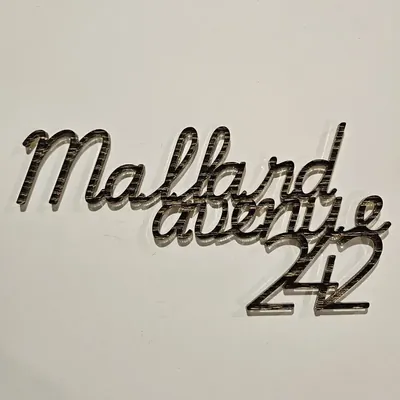
Most sign layouts mix typefaces: a script "welcome" over a bold "TO OUR HOME", a name over a date, a big word flanked by small ones. This tool gives every line its own collapsible settings panel, so each line can have its own font and its own nudge, and the lines overlap into a single connected piece.
Because the result is one merged path, the whole composition cuts or prints in one go: no aligning separate words on the bed, no gluing fragments. Export SVG for the laser or STL/3MF for the printer.
What You'll Need
- Laser cutting: laser cutter, 3 mm laser-grade plywood or acrylic
- 3D printing: any FDM printer, one or two filament colors
Step 1 - Add your lines
Open the tool and add a line per row of your design. Expand each line's panel to set its text and its own Font; the classic recipe is script for the emotional word and a clean bold face for the factual ones.
Step 2 - Arrange and connect
- Use each line's offsets to slide it until it overlaps its neighbours; the preview shows the merged result live.
- Text Width sets the overall finished size in real units.
- Thickness expands the merged path, thickening fragile joints where lines meet.
- Check every junction in the preview; any line that does not touch another will cut as a separate piece.
Step 3 - Export
Download an SVG for laser cutting or an STL/3MF at your chosen depth for 3D printing.
Choose Your Build Method
Cutting the sign
- Import the SVG and scale-check against your sheet; layered phrase signs typically run 200 to 400 mm wide.
- Cut from masked 3 mm plywood or cast acrylic.
- Support delicate script lines as the cut finishes so they do not drop and skew.
- Paint or stain, then mount on a contrasting backer board for a farmhouse-style sign.
- For mixed-material looks, cut the script line separately from a second color and glue it over its outline.
Make It Yours
- "welcome" in script over TO OUR HOME in caps, the all-time bestseller.
- Name over established date for wedding and housewarming gifts.
- Stack "best" "dad" "ever" in three fonts for Father's Day.
- Teacher sign: subject in bold, teacher name in script underneath.
- Mix a tall condensed font with a wide script line for editorial-poster energy.
- Make a bar sign: family name, then BAR, then "est." and a year.
- Cut a mini version at 100 mm as a tiered-tray sitter.
- Pair with the Stacked Text tool when you want uniform-font stacks instead of mixed fonts.
New free tools, every month.
New laser cutting tools, what's coming next, and features we're building right now. Only MyLaserTools.com news. No spam, ever.
© 2026 MyLaserTools.com. All rights reserved.