

Making a plate frame with the License Plate Holder Generator
Difficulty: easy. Time: 15 minutes. Methods: laser cutting or 3D printing.
A plate frame surrounds a real or novelty plate with your own message. Start from a preset like MY OTHER RIDE / IS A SPACESHIP, then set the size and border width; the window cutout is sized automatically.
Pick a frame shape, either rectangular or notched corners, and add an outline around the text for extra pop.
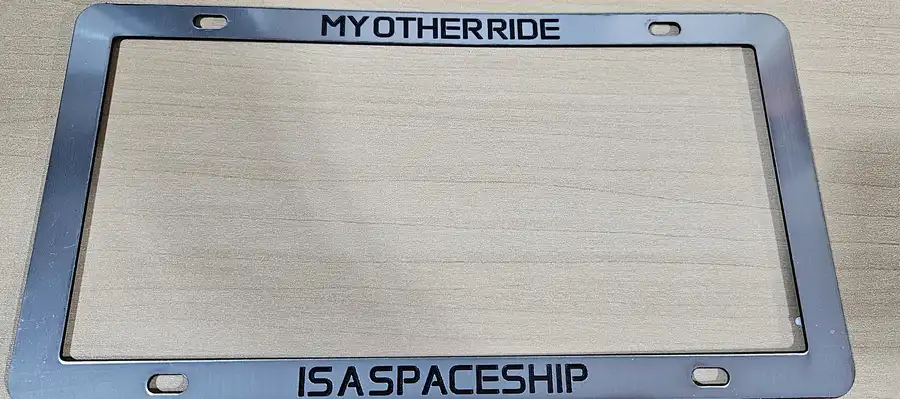
What You'll Need
- A two-tone sheet, for example double-color acrylic, brushed chrome engraves black
- A laser, or an FDM printer
- Screws to mount the frame with the plate
Step 1 - Frame size and shape
Set the outer size and border width, then choose a frame shape: rectangular or notched.
Step 2 - Text, outline, and holes
Edit the top and bottom text, turn on Outline Text for a halo around the letters, and pick a mounting style: none, two holes, or four slots.
Choose Your Build Method
Cut and fit
Download the SVG: the outline, window, and holes cut; the text engraves with an optional score outline. Fit it over the plate and screw it on.
Make It Yours
- Car-club, dealership, and family-name frames
- Rectangular or notched-corner frames for a clean or themed look
- Match the frame colour to the car
Keep up with MyLaserTools.
Email me about new tools, product updates, tutorials, and occasional MyLaserTools offers. Unsubscribe at any time.
© 2026 MyLaserTools.com. All rights reserved.