

Making a national-park trail map with the Forest and Trails preset
Difficulty: Medium. Time: 2–3 hours. Best methods, in order: laser cutting (cut the fills, engrave the trails), UV print, 3D printing.
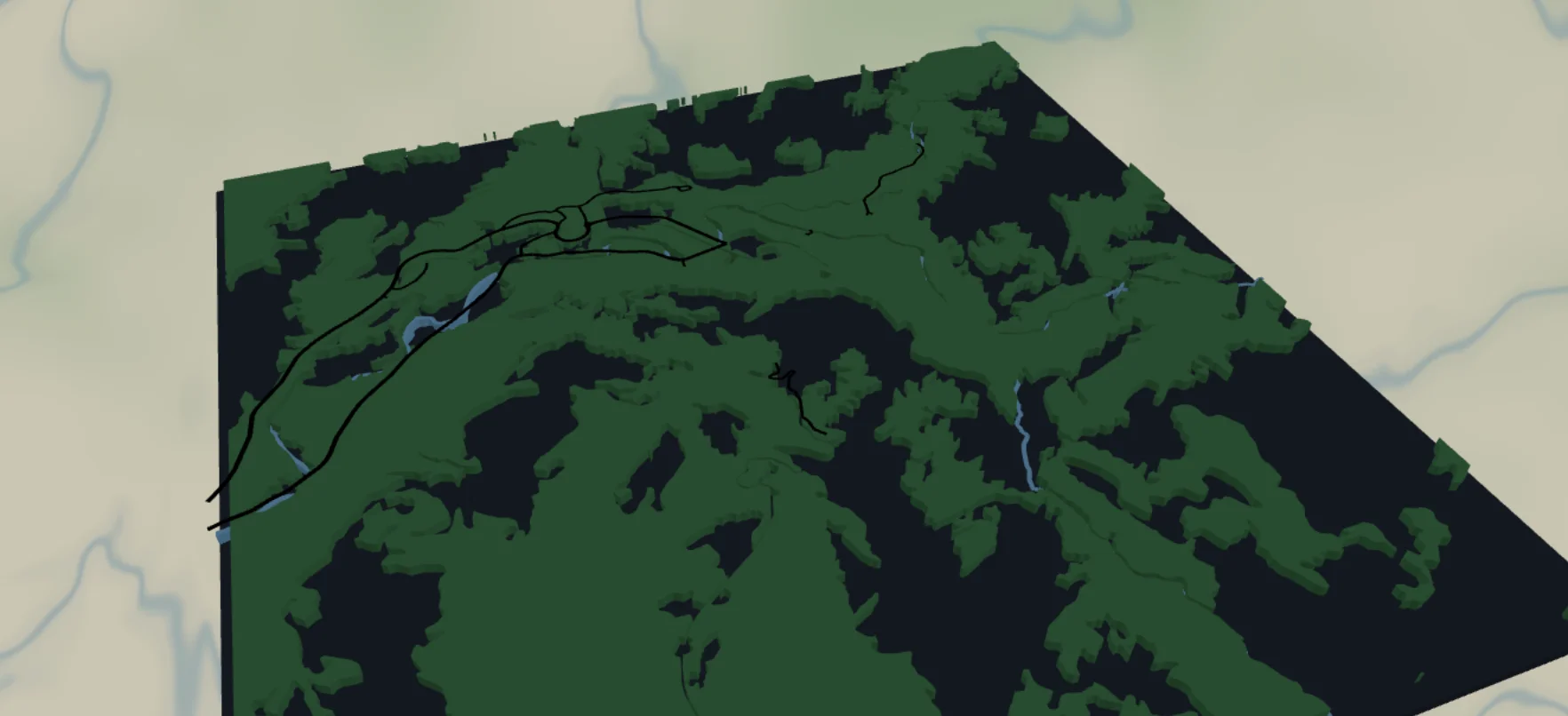
This preset recreates the national-park visitor map in layers: hiking trails and park roads over forest green, rivers and lakes in blue, all on a dark backplate. It loads on Yosemite Valley and suits any park, trail network, or favorite hiking area.
What You'll Need
Laser cutting
- 3 mm laser-grade plywood for the forest layer; a backplate sheet (dark stain,
#1f2937in the preset) - Optional blue acrylic for water
- Laser cutter, glue, weights - plus plan to fill-engrave the trails and score the park roads (neither is cut)
UV print / sublimation
- High-res PNG, flat blank - the flat version looks like a proper park poster
3D printing
- FDM printer; multicolor (3MF) recommended - green, blue, black, dark gray
Step 1 - Start from the preset
Open the Forest Trails preset. It loads on Yosemite Valley at zoom 12.6 - a whole valley with its trail web. Search your park and stay around zoom 12–13.5: wide enough to catch the trail network, close enough that individual paths separate. Frame so a river or lake anchors the composition; trails alone can read as scribbles.
Step 2 - Tune the layers
Five layers, top to bottom:
- Trails - Solid mode,
roadsPathat width 2, black. The star of the preset: every hiking path in frame, exported as solid fills (fill-engrave them on a laser). If the web is too dense, zoom in slightly rather than thickening lines. - Park roads - Score mode,
roadsSecondary(width 3) androadsStreet(width 2), black. The drivable loop roads; on a laser these score as single-pass centerlines (line mode). Toggle offroadsStreetfor backcountry areas. - Forest - Solid mode,
landcoverForestfilled#2E7D43. Big organic green shapes - the body of the piece. - Water - Solid mode: lakes/rivers filled
#4EA8DE, pluswaterwayRiver(width 3) andwaterwayStream(width 2) as ribbons. - Backplate -
#1f2937dark slate; reads as granite/meadow wherever forest isn't.
For flat prints, note that black trails over the dark backplate can get lost - recolor Trails to a warm tan like #E8DCC0 for print versions.
Step 3 - Export
- Laser: per-layer SVG ZIP. Cut Forest, Water, and the Backplate; fill-engrave Trails (solid ribbons too stringy to cut and glue) and score Park roads as single-pass lines. Small-polygon cleanup on - forest cover is full of sliver polygons.
- UV print: high-res PNG; recolor trails first (see above). Background off gives a transparent PNG for printing on wood, where bare substrate plays the granite role.
- 3D printing: 3MF for the four colors; STL if you'll paint.
Choose Your Build Method
Laser cutting
- Cut the Backplate from dark-stained stock.
- Cut the Water layer - lake and river shapes - from blue acrylic or painted ply. Tape before cutting; stream ribbons are delicate, and it's fine to let the thinnest ones go and keep only the main river.
- Cut the Forest layer from your green material - large organic pieces, easy to handle.
- Glue water and forest onto the backplate using the screen as the placement guide. 3M tape 467 or 468 is ideal for acrylic water shapes; 300LSE grips harder materials.
- Score Park roads as single-pass lines, then fill-engrave Trails, through the assembled top surface (or onto the forest layer before gluing - test alignment on scrap first). Trails burned through the green look like routed paths.
- Finish matte; a thin frame in the backplate color completes the park-poster look.
Make It Yours
- Works anywhere trails cluster: Yosemite, Zion, Banff, your local state park or trail-running network.
- Highlight the hike: keep Trails subtle and add a route layer over your exact line in a bold color.
- Autumn palette: forest
#B5651D, water#3E6B8C, trails cream. - Topo mashup: add two or three topography layers under the forest for valley walls.
- Engrave trailhead names and mileages along the bottom margin.
- Patch version: small export + Stitch holes mounting option, cut from leatherette.
- Mark the campsite or proposal spot with a heart icon at export.
New free tools, every month.
New laser cutting tools, what's coming next, and features we're building right now. Only MyLaserTools.com news. No spam, ever.
© 2026 MyLaserTools.com. All rights reserved.