

Making an architectural print with the Figure Ground Map preset
Difficulty: easy. Time: 30 minutes for a print, 1–2 hours engraved, 2–3 hours as a 3D plaque. Best methods, in order: UV printing, laser engraving, 3D printed plaque, sublimation.
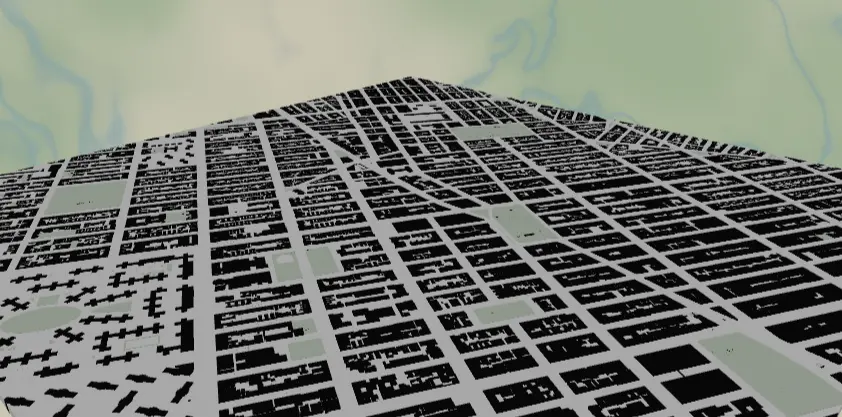
Figure-ground is the classic architecture-school drawing: every building footprint in solid black on white, nothing else but whisper-gray water and parks. This preset reproduces it straight from OSM building data, and the stark two-tone artwork is the most forgiving design in the whole set - it prints, engraves, and 3D prints beautifully because the contrast is absolute. Make a minimalist wall panel, a desk plaque, or an architect's gift.
What You'll Need
- UV printing: flatbed UV printer, white or clear acrylic, brushed aluminum, or maple plywood panels
- Sublimation: sublimation printer + paper, white poly-coated aluminum panel or hardboard, heat press, heat tape, butcher paper
- Laser engraving: CO2 or diode laser, light laser-grade plywood (maple/birch) or white-core two-tone acrylic - the black-on-white design maps 1:1 to engraved-on-raw
- 3D printing: any dual-color-capable printer; black + white filament is genuinely all you need
Step 1 - Start from the preset
Open the Figure-Ground Map preset. It loads Manhattan at zoom 14.2 - the neighborhood scale where individual building footprints read as texture but blocks still form patterns. That zoom is the sweet spot for this style: zoom out past ~13.5 and buildings shrink to pepper, zoom in past ~15 and you get a dozen big blobs. Search any city with good OSM building coverage (most of North America, Europe, Japan) and frame a district with personality - a street grid colliding with a diagonal avenue, a riverfront, a medieval core. Water along one edge gives the composition breathing room.
Step 2 - Tune the layers
One Solid layer group, Buildings - only four features, and that restraint is the style:
land-#FFFFFFpure white ground.water-#E3E3E1whisper gray. Deliberately subtle; darken to#CFCFCCif you want the shoreline to assert itself in print.landusePark-#DCE6D8faint sage, just enough to explain the building-free voids like Central Park.building-#111111, the entire show.
No road features at all - streets appear as negative white space between footprints, which is the figure-ground trick. Don't add roads; if a district looks empty, it's an OSM building-data gap, so pan to better-mapped blocks instead.
Step 3 - Export
- UV / sublimation: 4096 px PNG. On a white substrate, toggle Background off so the blank itself is the white ground - less ink, cleaner whites.
- Laser: combined SVG; the buildings are the only meaningful engrave geometry.
- 3D: 3MF for a two-tone stacked plaque.
- Enable small-polygon cleanup - city-scale building data is full of sheds and slivers that turn into specks at print size.
- Corner holes suit this design's gallery look for standoff wall mounting on anodized standoff spacers; add the compass icon overlay if the composition has a quiet corner for it.
Choose Your Build Method
UV printing
- Export the PNG with Background off (for white substrates) or on (for clear acrylic with a white underbase).
- In the RIP, size to your panel; this design holds up from 100 mm desk plaques to 600 mm statement pieces.
- On brushed aluminum, print the buildings with no underbase so the metal becomes the "white" - an instant architectural finish.
- Clean the substrate, register against the jig, print.
Sublimation
- Print mirrored at final size. Note that the
#E3E3E1water and#DCE6D8park tints are right at the edge of what sublimation can hold - they may wash to invisible. Either accept pure black-on-white (it looks great) or darken water to#C8C8C5before exporting. - Tape face-down to a white poly-coated panel.
- Press with the settings recommended for your material, paper, and inks, with butcher paper above and below.
- Peel hot; the solid black fields transfer densely and crisply.
Make It Yours
- Cities with dramatic block patterns: Barcelona's Eixample chamfered grid, Savannah's squares, Venice (water does the figure-ground for you), Tokyo's fine grain.
- Invert it: land
#111111, buildings#FFFFFF- the negative version UV-prints beautifully on black acrylic with Background off. - School-colors version: keep white ground, set
buildingto your team hex - that's exactly how the Campus Map preset works at closer zoom. - Warm gallery take: land
#F7F2E8, buildings#2B2B28for a softer archival-print feel on wood. - Switch export shape to circle for a porthole figure-ground; Manhattan's tip in a circle is iconic.
- Add a route layer in red
#E63946- one thin line through the black texture marks "our street" without breaking the style. - Print a 3-panel triptych of the same city at zoom 13 / 14.2 / 15.5 to show the grain coarsening.
- Heart export shape + Hanger hole turns your old neighborhood into an anniversary ornament.
New free tools, every month.
New laser cutting tools, what's coming next, and features we're building right now. Only MyLaserTools.com news. No spam, ever.
© 2026 MyLaserTools.com. All rights reserved.