

Making a gothic keepsake with the City Cemetery Map preset
Difficulty: easy. Time: 30–45 minutes printed, 2–3 hours as a 3D plaque. Best methods, in order: UV printing (especially black acrylic), 3D printed plaque, sublimation on white panels, laser engraving on coated materials.
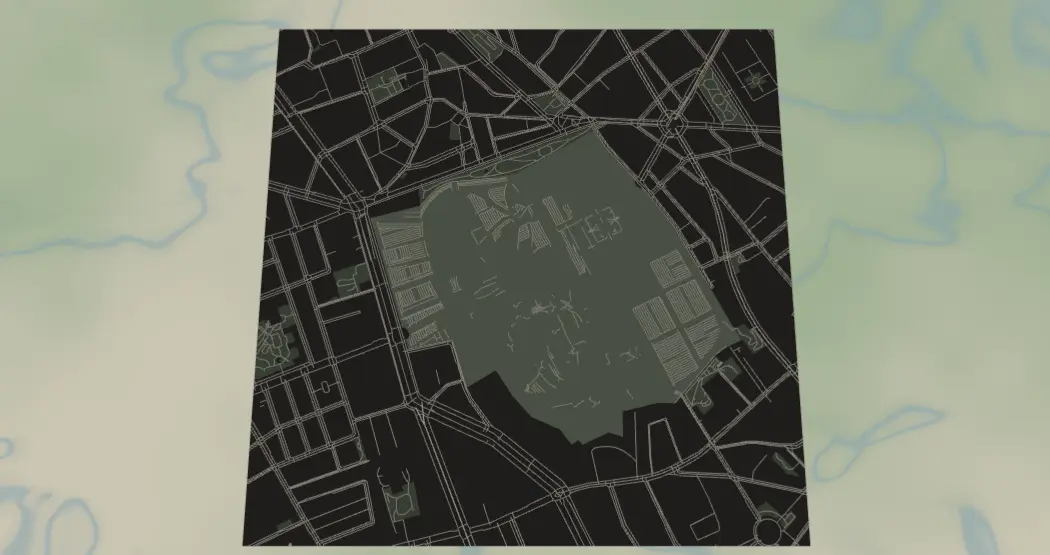
This preset maps historic cemeteries the way they deserve: sage-green grounds and bone-white paths floating on a charcoal night, framed at walking zoom on Père Lachaise. The winding path networks of garden cemeteries make genuinely beautiful abstract art - for walking-tour prints, genealogy gifts, Halloween decor, and anyone whose favorite place in a city is its quietest one.
What You'll Need
- UV printing: flatbed UV printer, black or charcoal acrylic (the background-off trick is made for this), or white acrylic/aluminum for the full-art version
- Sublimation: sublimation printer + paper, white poly-coated aluminum or hardboard (the charcoal field must come from ink), heat press, heat tape, butcher paper
- Laser engraving: laser plus black-anodized aluminum or black-cap two-tone acrylic; slate coasters also love this design
- 3D printing: multi-color printer; charcoal, sage, and bone filaments - just three or four colors
Step 1 - Start from the preset
Open the Cemetery Map preset. It loads Père Lachaise at zoom 15 - tight walking zoom, because a cemetery is a small subject and its path network is the art. Search your cemetery by name (the famous garden cemeteries geocode well: Highgate, Green-Wood, Mount Auburn, Recoleta, Bonaventure). Center so the cemetery's landuseCemetery polygon fills most of the frame with a ring of charcoal city around it - that dark margin is the composition. If the grounds are large, zoom out to 14.5; never wider than ~14 or the paths thin to threads.
Step 2 - Tune the layers
One Solid layer group, Cemetery:
land-#33312Echarcoal, the surrounding city as darkness.landuseCemetery-#6F7F66sage, the hero fill. This is what makes the grounds glow against the night.landusePark-#56644Fdeeper green for adjacent parks, one step darker so the cemetery stays the focus.water-#26323Anear-black blue.- Paths, bone-toned:
roadsSecondary#D9D2C0width 2,roadsStreet#C9C2AEwidth 1.5,roadsPath#BFB8A4width 1.5 -roadsPathis the one doing the real work inside the grounds; garden cemeteries are mostly footpaths.
Everything important is high-contrast: bone on sage, sage on charcoal. The palette survives every method. If your cemetery's internal paths are mapped as service roads rather than footpaths and the grounds look empty, that's an OSM data gap - pick a better-mapped cemetery or accept a quieter design.
Step 3 - Export
- UV on black acrylic: toggle Background off (and hide
water) - the charcoal city vanishes and the sage grounds with bone paths float on the black panel. The signature output for this preset. - Sublimation / white substrates: keep everything on; the ink builds the night.
- Laser: per-layer SVG ZIP, background off.
- 3D: 3MF.
- Hanger hole is the obvious Mounting holes pick - a cemetery-map ornament is peak gothic Christmas. Corner holes for a standoff wall piece on anodized standoff spacers. The compass icon overlay suits the walking-tour framing.
Choose Your Build Method
UV printing
- Export the transparent PNG (Background and water off) for black acrylic, or the full PNG for light substrates.
- In the RIP, add a white underbase beneath the sage and bone art so it sits opaque on the dark panel.
- Clean the acrylic with IPA, register, print.
- A matte varnish keeps it funereal; gloss makes it pop-gothic - both work.
Sublimation
- Print mirrored at final size, all layers on - the blank must be white; the charcoal field comes from ink.
- Tape face-down to a white poly aluminum panel.
- Press with the settings recommended for your material, paper, and inks, butcher paper above and below.
- Peel hot. Dense charcoal fields transfer well on gloss metal; the bone paths stay readable because they're printed tones, not knockouts.
Make It Yours
- The garden-cemetery canon: Highgate (London), Green-Wood (Brooklyn), Mount Auburn (Boston), Recoleta (Buenos Aires), Bonaventure (Savannah), Vienna Zentralfriedhof.
- Halloween swap: grounds
#4A3B5Cdusky violet, paths#E8DCC8, land#1A1A1A- full gothic. - Daylight-memorial swap: land
#F2EFE8, grounds#9DB58C, paths#FFFFFFfor a gentler genealogy gift. - Drop the heart icon overlay on a family plot for a memorial keepsake - handled with care, this is the most meaningful customization in the toolkit.
- Add a route layer in
#B08D57antique gold tracing the famous-graves walking tour (Wilde to Morrison at Père Lachaise). - Circle export + Hanger hole from black acrylic = the gothic ornament of the year.
- Print the city's three historic cemeteries as a matching triptych.
- Zoom out to 13 and let the cemetery sit as a small sage island in a sea of charcoal city - a quieter, more poetic composition.
New free tools, every month.
New laser cutting tools, what's coming next, and features we're building right now. Only MyLaserTools.com news. No spam, ever.
© 2026 MyLaserTools.com. All rights reserved.