

Making a graduation gift with the University Campus Map preset
Difficulty: easy. Time: 30–45 minutes printed, 2–3 hours as a 3D plaque. Best methods, in order: UV printing, sublimation on white panels, 3D printed plaque, laser engraving.
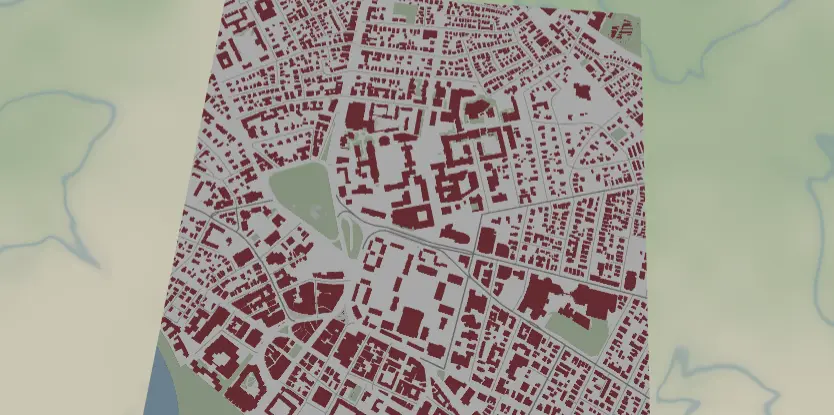
This preset is a figure-ground map in school colors: crimson building footprints on white, green quads, pale pedestrian paths, and a quiet gray street grid, framed at walking scale around campus. Swap the building color to any school's hex and you have an instant, deeply personal graduation or alumni gift - plaque, panel, or ornament.
What You'll Need
- UV printing: flatbed UV printer, white acrylic, brushed aluminum, or maple panels; an 8×10 plaque blank matches diploma-frame vibes
- Sublimation: sublimation printer + paper, white poly-coated aluminum panel or hardboard plaque, heat press, heat tape, butcher paper
- Laser engraving: diode or CO2 laser, light laser-grade plywood or white-core two-tone acrylic
- 3D printing: dual-color-capable printer; white base + school-color filament covers the design
Step 1 - Start from the preset
Open the Campus Map preset. It loads Harvard at zoom 14.8 - true walking zoom, where individual buildings, quads, and footpaths all resolve. That's the intent: a campus map should feel like the walk to class. Search the school (the campus name usually geocodes better than the city) and center on the heart of campus - the main quad, the oldest building, the student union. Keep zoom between 14.5 and 15.5: wider pulls in too much surrounding city, tighter loses the campus shape. Check that OSM building data covers the campus; most universities are mapped lovingly by their own students.
Step 2 - Tune the layers
One Solid layer group, Campus:
land-#FFFFFFwhite ground.water-#9FC5DCsoft blue (the Charles River frames Harvard; your campus river/lake is a gift, keep it in frame).landusePark-#CBDCC2quad green.pedestrianArea-#E8E8E8pale plazas and walkways - the feature that makes this read as campus rather than city.building-#A51C30, Harvard crimson. This is the layer to change: set it to the school's official hex (Michigan#00274C, Texas#BF5700, Oregon#154733, Penn State#041E42...).roadsSecondary#9A9A9Awidth 2 androadsStreet#B5B5B5width 1 - quiet context streets.
One contrast note: pedestrianArea at #E8E8E8 on white is near-invisible after sublimation's softening - fine as a whisper, or darken to #D8D8D8 if the path network matters to your composition (it often does on quads).
Step 3 - Export
- UV / sublimation: 4096 px PNG. On white substrates, toggle Background off so the blank provides the white - crisper and cheaper on ink.
- Laser: combined SVG; buildings carry the engrave.
- 3D: 3MF for the two-tone plaque.
- Enable small-polygon cleanup - campuses are full of kiosks, sheds, and bike shelters that render as flecks.
- Corner holes for an office piece mounted on anodized standoff spacers; Hanger hole if you're cutting a campus ornament for the grad's first tree. The heart icon overlay dropped on the building where they met their partner is a legitimately killer move.
Choose Your Build Method
UV printing
- Export the PNG (Background off for white substrates).
- Size in the RIP to the plaque; leave bottom margin if you plan to add the school name and class year in a separate text layer or vinyl.
- Register the blank, print; school-color fills come out dense and uniform on UV.
- Optional gloss varnish over just the buildings makes them pop like enamel.
Sublimation
- Print mirrored at final size.
- Tape face-down to a white poly panel or hardboard plaque blank.
- Press with the settings recommended for your material, paper, and inks, butcher paper above and below.
- Peel hot. Saturated building color transfers richly; expect the
#E8E8E8pedestrian areas to mostly vanish (see Step 2 if you want them kept).
Make It Yours
- Photogenic campuses: Oxford's colleges, Stanford's oval, UVA's Lawn, Michigan's Diag, Bologna's porticoes.
- Swap
buildingto the school hex andlanduseParka touch toward the secondary color for full brand treatment. - Rivalry diptych: two schools, two panels, identical layout - wedding gift for a house-divided couple.
- Drop the heart icon overlay on the dorm, the lab, or the spot they got engaged.
- Add a route layer tracing the daily walk from dorm to department in the school's secondary color.
- Circle export + Hanger hole = graduation-year ornament; press a batch for the whole friend group.
- Zoom to 15.5 on just the main quad for a minimal "heart of campus" version with a handful of buildings.
- Pair with the Figure Ground preset of the college town for a campus-and-city set.
New free tools, every month.
New laser cutting tools, what's coming next, and features we're building right now. Only MyLaserTools.com news. No spam, ever.
© 2026 MyLaserTools.com. All rights reserved.